

Online events have attracted attention as a way to hold gatherings while reducing infection risks following the spread of COVID-19.
If you are planning or running one for the first time, you may be unsure about the steps, precautions, or how to explain its benefits.
This article covers:
- The definition and types of online events
- Advantages and disadvantages
- Ways to make an online event successful
- Practical examples
It also answers common questions to help with planning and operation.
CommentScreen offers features for running events more effectively, including easy-to-set-up real-time communication and quizzes that add excitement. Register for free below to try it.
What is an online event?
An online event takes place over the internet without requiring everyone to be in a particular location. The global spread of COVID-19 and advances in digital technology have accelerated its adoption.
Although broadly defined as a virtual event delivered over the internet, the format varies greatly. It can include industry webinars, business meetings, public concerts, and gaming competitions, depending on the purpose and audience.
Online events have become an important option for companies and event organizers.
Types and characteristics of online events
Online events can be divided into business and public categories, with one-way or two-way communication.
| Category | Format | Examples |
|---|---|---|
| Business events | One-way | Online seminars |
| Business events | Two-way | Business meetings and all-hands meetings |
| Public events | One-way | Live performances |
| Public events | Two-way | Social gatherings |
In a one-way format, speakers deliver information to viewers, as in an online seminar with a large audience.
In a two-way format, participants communicate through live conversation or chat. Examples include company events where people connect over lunch or games.
Business events
| Format | Type | Characteristics |
|---|---|---|
| One-way or two-way | Seminars and webinars | A speaker gives a presentation online. |
| One-way or two-way | Company information sessions | A company presents itself using web conferencing tools. |
| Two-way | Exhibitions and business meetings | Products are displayed and business discussions take place in a virtual space. |
| Two-way | General meetings and conferences | Meetings for employees or shareholders are held online. |
Understanding the format helps you plan a successful event.
Seminars and webinars
A webinar is an online event a company can hold for employees or customers.
Key features include:
- Participation from any location
- Slide and demonstration screen sharing
- Recordings for later use
It can be a one-way presentation or a two-way session with interaction. Q&A and chat let participants submit questions in real time without waiting for a speaking opportunity.
Combining online features with meaningful interaction between the speaker and audience can improve the event’s quality.
Company information sessions
These sessions introduce a company’s appeal, work, and workplace to prospective graduate or mid-career hires. Going online helps reach a wider audience, including people too far away to attend in person.
Formats include:
- Live streaming: present the company in real time and answer questions through chat.
- On-demand streaming: publish a prerecorded video and accept questions by email or an online form.
- Virtual experiences: let participants control avatars in a virtual space for a simple interactive experience.
A major advantage is the ability to explain the company’s philosophy, atmosphere, and benefits while answering questions. If staffing is limited, organizers can adjust attendance or use a one-way format.
Exhibitions and business meetings
Online exhibitions and business meetings introduce products and services in a virtual space without requiring visitors to travel.
Exhibitors can create online booths and communicate with visitors in real time. Key features include:
- Flexibility of time and location
- Easy distribution of materials and sharing of demonstrations
- Archived content that can be revisited
They can provide a sense of presence that email and phone calls lack. Exhibition content can also remain useful after the event.
However, visitors cannot physically handle products. Depending on the product, sending samples or preparing detailed materials in advance may be important.
All-hands and company-wide meetings
These are regular opportunities for decision-making and aligning employees around the company’s direction.
Online meetings allow:
- Employees in distant locations to attend
- Employees who miss the event to watch a recording
- Easy distribution and sharing of materials
The flexibility makes participation easier for employees who cannot attend in person.
For planning steps and success tips, see All-Hands Meetings.
Shareholder meetings
Shareholder meetings traditionally gathered shareholders in one venue, but virtual meetings have become more common.
Benefits include:
- Lower travel costs for shareholders
- No need to change venues as attendance changes
- Easier participation for shareholders who live far away
They offer convenience and lower operating costs. However, clear participation instructions and measures to prevent information leaks are important. Run the meeting efficiently while respecting shareholders’ rights.
Public events
| Format | Type | Characteristics |
|---|---|---|
| One-way or two-way | Online concerts and live events | Artists perform live online. |
| One-way or two-way | Esports tournaments and gaming events | Competitions and gaming activities take place online. |
| Two-way | Social gatherings | Hobby groups, matchmaking parties, and other social activities take place online. |
Many public events focus on entertainment.
Online concerts and live events
Online concerts and live events spread rapidly during the pandemic. They include music, comedy, theater, and many other forms of entertainment.
Features include:
- Freedom from physical venue capacity limits
- Access from anywhere
- Both paid and free formats
YouTube Live and Instagram Live are common platforms, though dedicated apps are also used.
Many performances are one-way, but replying to comments in real time can create an interactive experience unique to online events.
Esports tournaments and gaming events
Increasingly popular esports and gaming events are often held online.
Features include:
- Participation by gamers around the world
- No physical venue setup
- Lower infection risk than in-person gatherings
Their accessibility has helped establish them as a new form of entertainment. Advances in technology are likely to make them still more appealing and easier to join.
Social gatherings
Online gatherings offer new ways for people to connect, using features different from traditional in-person events.
They can:
- Recreate business card exchanges and informal conversations digitally
- Use breakout rooms for small groups
- Allow different participation styles, including chat
People can meet and exchange ideas from home. Suitable technology and thoughtful design can broaden what a social gathering offers.
Benefits and drawbacks of online events
Consider the purpose and nature of your event when deciding whether to hold it online.
Benefits
| Benefit | Details |
|---|---|
| Easier participation | No travel is required, making attendance easier for people who live far away or have limited mobility. |
| Lower costs | Venue, setup, and participant travel costs can be reduced. |
| Data collection | Participant activity and survey responses are easier to collect and analyze. |
| Document sharing | Digital materials reduce printing costs and support paperless operation. |
| Recordings | The event can be recorded and watched later. |
These advantages must be weighed against drawbacks such as reduced face-to-face communication.
Drawbacks
| Drawback | Details |
|---|---|
| Distraction | Participants may find it harder to concentrate than at an in-person event. |
| Dependence on connectivity | Connection problems or technical streaming issues can occur. |
| Difficulty communicating | Direct interaction and close communication between participants can be harder. |
| Security risks | Personal or company information may be exposed without authorization. |
Prepare appropriate measures in advance, especially for connection stability and security.
Tips for a successful online event
Define the purpose and audience, choose a suitable platform, promote effectively, and encourage two-way communication. Security and follow-up also matter.
1. Define the purpose and audience
Clarify these before deciding the content and audience acquisition methods. Vague objectives may prevent you from achieving the expected results.
| Purpose | Audience |
|---|---|
| Promoting a new product | Existing and prospective customers |
| Providing information | Existing customers |
| Acquiring new customers | Prospective customers |
| Employee training | Your employees |
| Branding | General consumers |
Use the purpose and audience to guide the event.
2. Choose a suitable platform
Consider the purpose, expected attendance, and necessary features.
| Platform | Characteristics |
|---|---|
| Zoom | Easy to use, with features such as breakout rooms. |
| Microsoft Teams | Extensive chat features and enterprise security measures. |
| YouTube Live | Suitable for large live audiences and easy archiving. |
Choose according to the purpose. For example, Zoom can suit seminars, while YouTube Live can suit large product launches. Balance participant convenience with operational requirements.
3. Promote effectively
Promotion is essential for attracting participants.
| Method | Details |
|---|---|
| Social media | Share event information on Facebook, Twitter, Instagram, and other platforms. |
| Email newsletters | Reach existing customers and fans directly. |
| Influencer partnerships | Collaborate on content and use influencers’ reach. |
| Offline promotion | Distribute flyers and display posters. |
Combine channels and communicate consistently in ways suited to your audience.
4. Encourage two-way communication
One-way delivery makes it difficult to understand participants’ interests or comprehension.
Provide ways to take an active role:
| Tool | Purpose |
|---|---|
| Chat | Ask speakers and staff questions in real time. |
| Surveys | Collect participants’ interests and opinions. |
| Group discussions | Let participants discuss ideas freely. |
Combining these tools can create a more involving event.
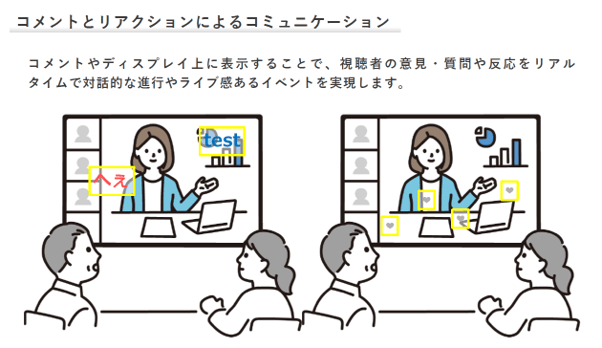
For example, CommentScreen enables communication through comments and reactions.
Reference: CommentScreen
It can strengthen participants’ sense of involvement and make the event feel more unified.
5. Ensure security and privacy
| Area | Measures |
|---|---|
| Personal information | Explain collection purposes and prohibit disclosure to third parties. |
| Video and audio | Obtain permission for recording and distribution. |
| Chat and Q&A | Use anonymization and moderator oversight. |
| Access management | Use passwords, two-step authentication, and access restrictions. |
Both security and privacy deserve careful attention. Choose a reliable platform and operate it appropriately so people can participate with confidence.
6. Follow up appropriately
After the event:
- Send a survey asking for impressions and suggestions.
- Publish answers to questions that could not be addressed during the event.
- Share related articles, videos, or other materials.
- Announce the next event.
Good follow-up can improve satisfaction and build an ongoing relationship. Use feedback to improve future events.
Examples of online events
Careful preparation and suitable tools are central to success. Learn from examples to develop an approach that fits your company.
The following examples show how interaction can affect results.
Success: Encouraging interaction at an award ceremony
An online internal award ceremony and kickoff event faced the challenge of encouraging interaction between participants.
CommentScreen was introduced to bridge the sense of distance between attendees that had also been difficult to avoid at in-person events. It provided two-way communication for an event of around 1,000 people, creating an active online space for interaction.
Following a direct inquiry, the organizers worked with an event company to introduce the tool. Participants were able to connect with each other online, contributing to a highly successful event.
Failure: A one-way product presentation
A new-product presentation relied on slides, with several problems:
- Questions in chat were overlooked.
- The slide presentation was too long and participants became bored.
- There were no surveys or other opportunities to express opinions, leading people to leave.
Although Q&A was scheduled at the end, many participants left before it began. The event failed to communicate the product’s appeal.
Online events can leave people feeling more isolated than in-person ones. Include two-way communication and active participation.
Use surveys and breakout sessions instead of only showing materials. The host’s and speaker’s facilitation skills also matter: they need to respond to questions effectively and keep conversation going.
Four frequently asked questions
1. How should I plan an online event?
For example, an online seminar can be planned in four steps.
- Clarify the purpose and audience. Is the goal awareness, leads, or sales? Who is the audience, and what are their characteristics, challenges, and needs?
- Decide the content. Choose a relevant topic and speakers, such as internal or external experts or influencers.
- Choose the date, time, and platform. Make attendance convenient and select a suitable platform such as Zoom or YouTube.
- Plan and carry out promotion. Create a landing page, post on social media, advertise, and send newsletters or direct messages.
This sequence helps create an effective plan.
2. How can I attract participants?
| Method | Details |
|---|---|
| Social media advertising | Reach target users through Facebook, Twitter, Instagram, and other social networks. |
| Email newsletters | Inform existing members and reach people with a strong interest. |
| Search advertising | Direct people to the event page through search engines such as Google and Yahoo. |
| Affiliate promotion | Pay external partner sites based on results for referrals to the event page. |
| Sponsored articles | Partner with external media to attract participants through credible content. |
| Guest promotion | Use guests’ influence to reach their fans. |
Combine methods according to the event’s scale, budget, and audience.
3. How should I choose an event tool?
| Consideration | Question |
|---|---|
| Attendance | Can it support the expected number of participants? |
| Features | Does it include the necessary chat, voting, and other functions? |
| Ease of use | Is it simple for participants to operate? |
| Price | Does it fit the budget? |
| Security | Does it provide adequate data protection and access controls? |
Compatibility with your IT environment and the quality of support also matter.
Compare several tools and use free trials to test the experience before choosing.
4. How should I choose an event agency?
If internal resources are insufficient, consider a specialist agency.
| Consideration | Details |
|---|---|
| Experience | Choose a company with a strong record of similar online events. |
| Planning ability | Look for useful advice from the planning stage. |
| Flexibility | Choose a company that can adapt to your needs. |
| Value for money | Check that pricing is appropriate for the services provided. |
An agency can make up for limited resources, support smooth operation, and improve results. Sharing information externally also creates confidentiality risks, so consider nondisclosure arrangements.
Clear objectives help make online events successful
Online events have different characteristics from in-person gatherings. Plan and operate them with these differences in mind.
Starting from scratch takes time, and choosing equipment and tools can be difficult. Consider consulting a professional.
If you need help from the planning stage, contact us below.