

Hybrid events combine in-person and online participation. Since the COVID-19 pandemic, combining the two has increasingly become standard.
When planning one, however, you may wonder what to do, how to explain its benefits internally, or which steps to follow.
This article covers:
- An overview of hybrid events
- Advantages and disadvantages
- How to organize a hybrid event
- Examples
It also answers common planning questions.
If you are looking for a tool to make your hybrid event more engaging, try CommentScreen. Comments and reactions make communication easy, while quizzes help add excitement on the day. Register for free below to try it.
What is a hybrid event?
A hybrid event runs online and in person at the same time. Participants can choose either format, making attendance easier and opening up creative possibilities that combine the two.
The balance between online and in-person participation varies by event.
If the main aim is to communicate information, emphasizing the online element can keep costs down. If the physical experience is more important, the venue may be the focus, with archived video available online.
Here are the benefits in more detail.
Three benefits of hybrid events
The main advantages are:
- Higher attendance and a more lively event
- Experiences unique to online participation
- Recordings that can be reused afterward
1. Higher attendance and a more lively event
A hybrid format makes it easier for people who usually cannot attend to participate.
For example, employees working remotely far from the office may struggle to attend an in-person company event because of travel time. Low attendance can make it difficult to create the energy needed for a large event.
An online-only event may attract more attendees but can lack the excitement of face-to-face conversation. A hybrid format offers both options.
2. Experiences unique to online participation
A hybrid event can include experiences that an in-person-only event cannot.
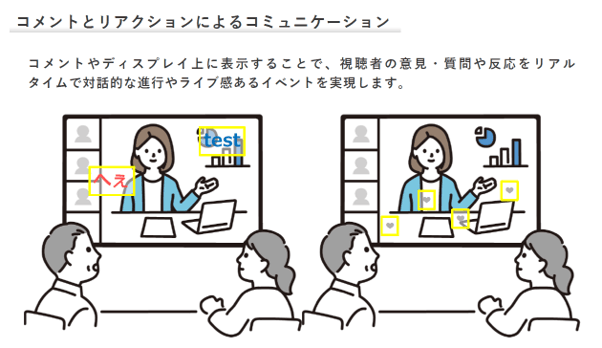
For example, CommentScreen lets participants share comments and reactions in real time.
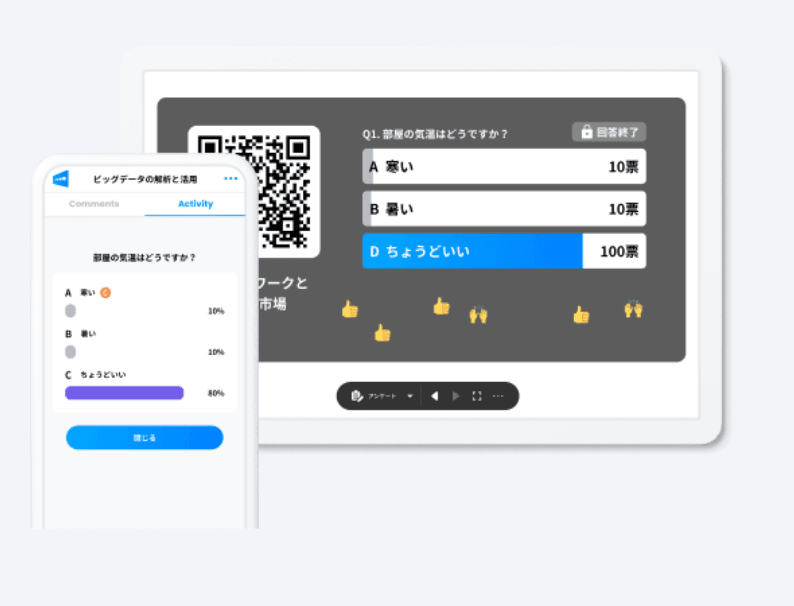
You can also run polls at suitable intervals, helping the entire audience feel involved.
Contact us below to learn more about CommentScreen.
3. Recordings that can be reused afterward
Recording a purely in-person event requires a camera and someone to operate it. Quality depends on the operator, and hiring a professional adds cost.
A hybrid event can easily produce an archive by recording the online screen. This provides a consistent recording without depending on camera operation and is useful when you want to reuse event footage.
Two disadvantages of hybrid events
Understanding the drawbacks in advance makes preparation easier:
- Additional preparation for the online event
- More complex event operation
1. Additional preparation for the online event
Because the event takes place both online and in person, you need to prepare for both.
Design an experience that everyone can enjoy, paying particular attention to online participants. Simply connecting a screen may leave remote attendees feeling excluded.
Consider tools and activities that make it easy for them to communicate. If planning a hybrid event is unfamiliar or difficult, contact us below.
2. More complex event operation
Your operating team must support both audiences.
A lively venue does not necessarily mean online participants are engaged, especially if there are few online comments. Actively include remote attendees through questions, polls, and quizzes.
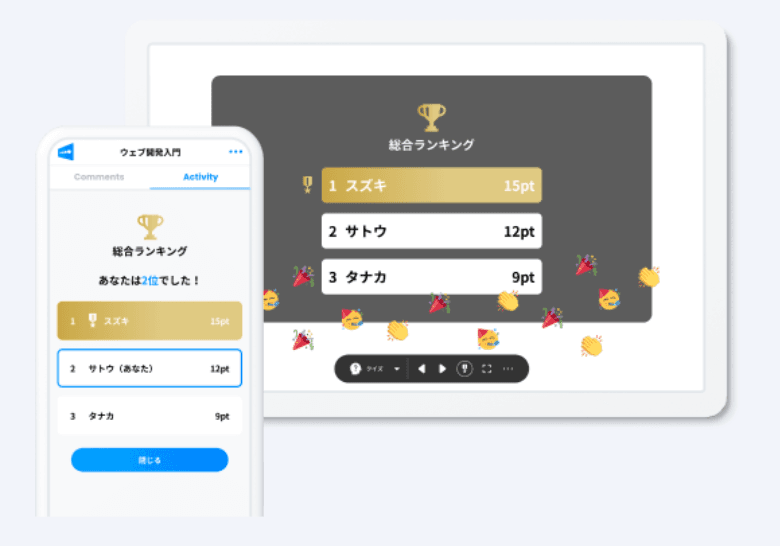
Reference: CommentScreen
If possible, assign different people to monitor online comments and the situation at the venue.
Seven steps for organizing a hybrid event
- Assemble the planning team.
- Plan the event content.
- Review the plan from a marketing perspective.
- Prepare equipment and platforms.
- Rehearse.
- Hold the event and collect survey responses.
- Review the event with the planning team.
Step 1: Assemble the planning team
Build a team with the skills and enthusiasm needed from the planning stage onward. Clarify each member’s strengths and responsibilities.
The following illustrates a possible division of roles.
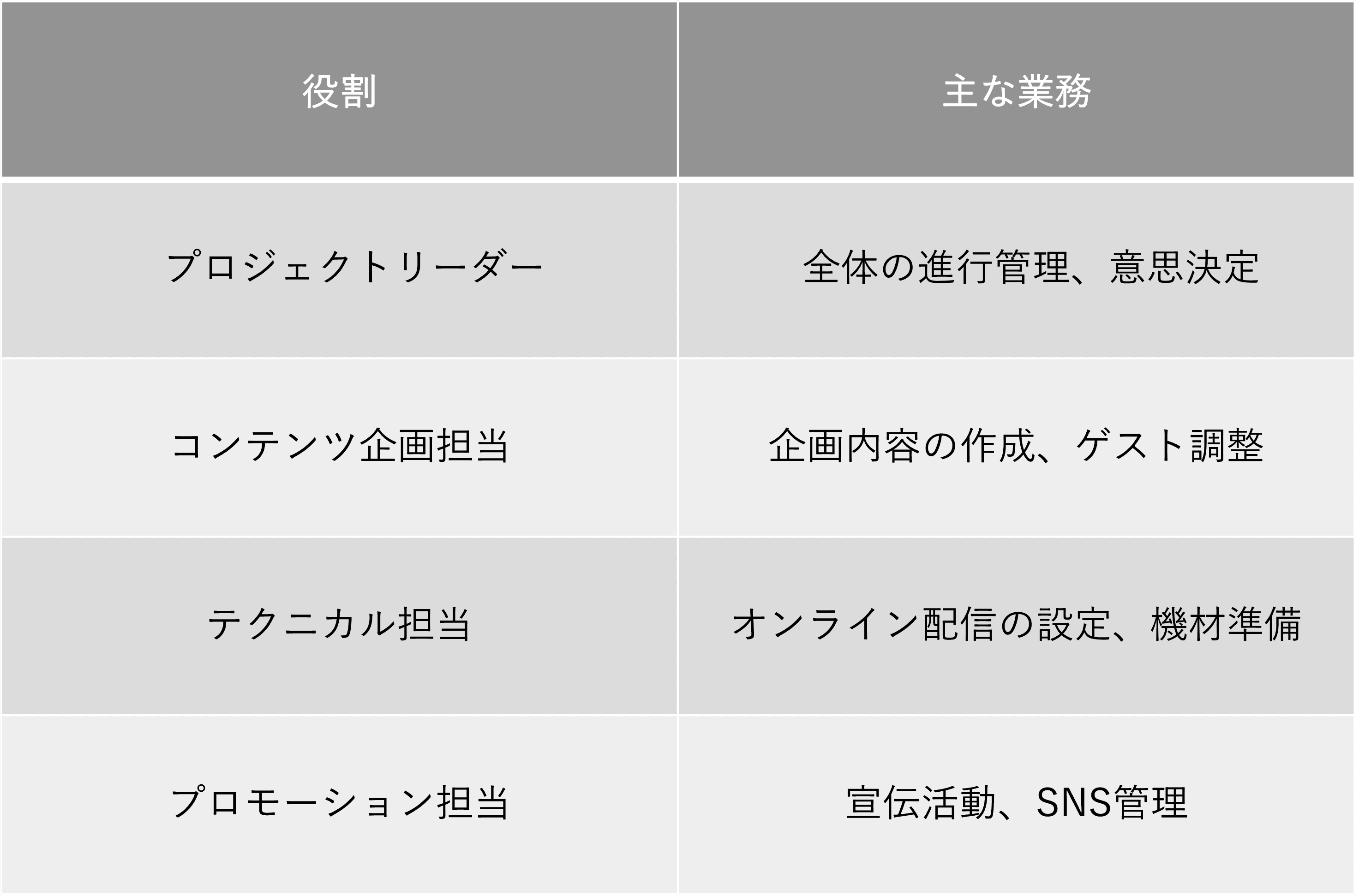
When everyone understands their role and cooperates, the event is more likely to succeed. Hold regular meetings to share progress.
Step 2: Plan the event content
Decide what will happen and in what order:
- Define the purpose.
- Determine the scale.
- Design an experience that works online and in person.
The purpose might be a product launch, knowledge sharing, or interaction between employees. Determine the number of attendees, venue size, and expected online audience before deciding the program.
The key is an event that everyone can enjoy. Real-time chat and Q&A sessions can help online attendees participate actively.
Step 3: Review the plan from a marketing perspective
Once the purpose is clear, reconsider the plan in terms of marketing.
If you overlook this step, you may be unable to collect the information you need on the day. For example, an event report cannot include participant feedback if you did not conduct a survey. Without a recording, it may be difficult to show the atmosphere through images or video.
Decide in advance what marketing activities you want to carry out after the event.
Step 4: Prepare equipment and platforms
Appropriate equipment and an accessible platform are essential for smooth operation.
Equipment for good audio and video may include:
- A high-resolution camera for clear images
- A high-quality microphone for clear audio
- Lighting equipment to adjust brightness and color
- Backdrops to improve the background
Familiar platforms such as Zoom and YouTube are recommended. Also consider tools with interactive features.
Step 5: Rehearse
A thorough rehearsal checks the flow and helps prevent problems. Review:
- The overall schedule and proceedings
- Streaming settings and equipment operation
- Responses to unexpected situations
Rehearse in the actual environment if possible. If the venue is unavailable, use a meeting room of similar size.
Include people acting as participants as well as the host, and ask for their feedback afterward. Use the rehearsal to confirm everyone’s responsibilities and tasks.
Step 6: Hold the event and collect survey responses
After the event, use a survey to assess its effectiveness.
Focus on satisfaction and opportunities for improvement, while also considering the marketing needs identified in Step 3. The results can guide a better event next time.
Step 7: Review the event with the planning team
Bring the whole team together to identify successes and improvements.
First, share the survey results and take participant feedback seriously. Then discuss the event from perspectives such as those shown below.
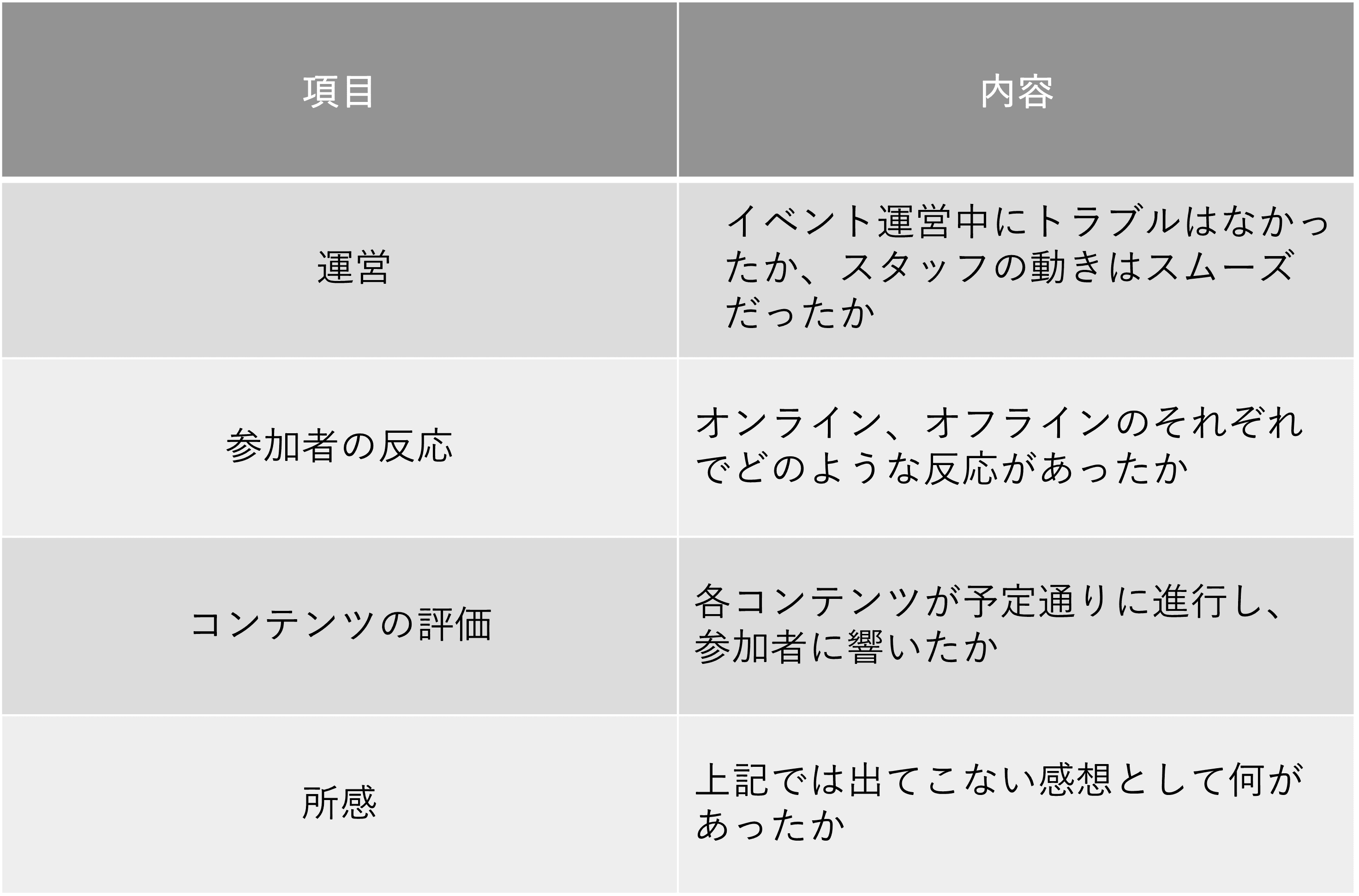
An honest exchange of views will help improve future planning.
Examples of hybrid events
Three examples are:
- Company all-hands meetings
- Music festivals
- Hybrid award ceremonies
1. Company all-hands meetings
Company all-hands meetings are a typical hybrid event.
Traditionally, all employees gathered for management reports and discussion. Since the pandemic, combining physical attendance with online participation has become more common.
Management and some employees can gather at an office or venue while cameras and microphones stream the meeting in real time. Remote employees can contribute through a video conferencing system, helping the workforce communicate together.
Fewer time and location constraints also improve attendance. Hybrid events are an effective way to support new working arrangements.
For more information, see All-Hands Meetings.
2. Music festivals
A music festival combining online and in-person experiences can reach fans around the world.
Alongside stage performances, online-exclusive content can make remote participation feel special. Sharing live streams and archived footage on social media also helps communicate the festival’s appeal.
This format gives audiences more flexibility to enjoy entertainment in a way that suits them.
3. Hybrid award ceremonies
Hybrid award ceremonies combine a venue and online stream, with production designed to involve remote participants.
For example, a large widescreen display on stage can show impressive footage during presentations. Building the ceremony around video allows both audiences to enjoy it. Showing remote participants on the screen can also create a sense of togetherness.
Prepare multiple cameras to share the venue experience online, and provide a way for everyone to communicate in real time.
CommentScreen, for example, enables interaction through comments and reactions.
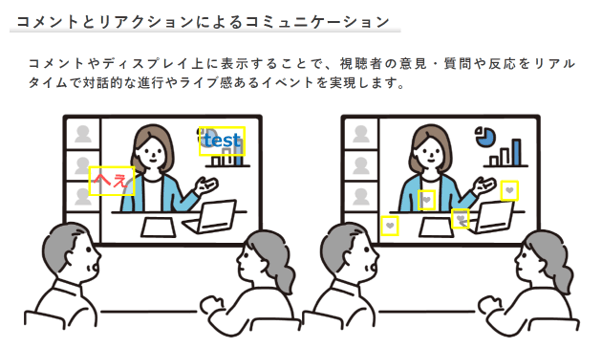
Reference: CommentScreen
Online attendees can send congratulations directly, helping the ceremony feel more unified.
Creative production and suitable technology can make a hybrid event enjoyable for everyone.
Three common questions about hybrid events
1. What equipment is needed?
Prepare both venue facilities and online streaming equipment.
Venue facilities may include:
- Audio systems: microphones and speakers
- Video systems: projectors and screens
- Lighting systems: spotlights and dimmers
Streaming equipment may include:
- A high-resolution camera
- A microphone for clear audio
- A high-performance computer to control the stream
- Software for live streaming, editing, and recording
Requirements vary with the event’s scale and content, so choose equipment carefully during planning.
2. How much does a hybrid event cost?
Costs vary greatly depending on scale, content, equipment, and platforms.
As a rough guide, small events often cost several hundred thousand yen, while large events may cost several million to tens of millions of yen.
The following shows examples of cost categories.
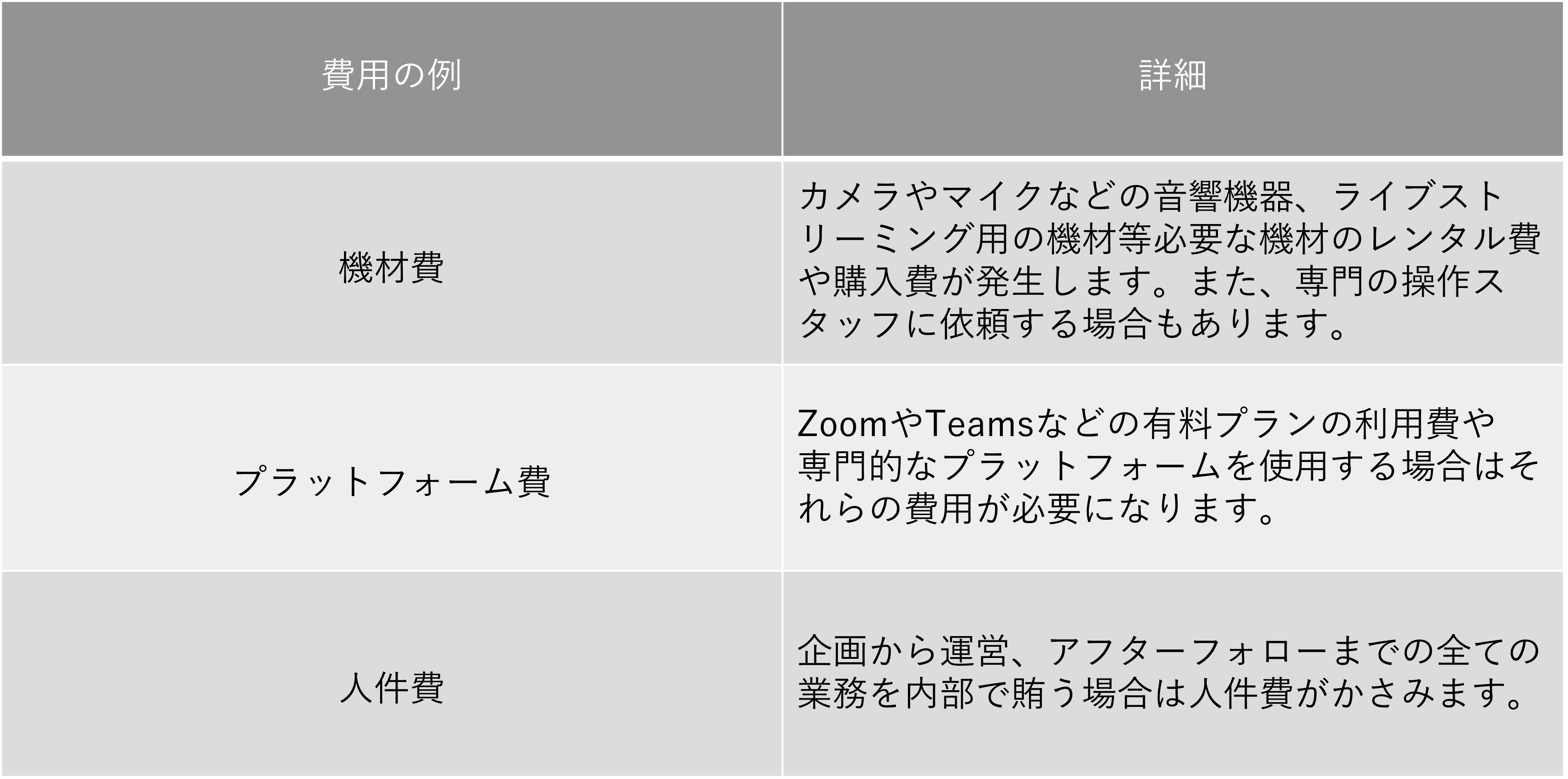
Actual costs depend on the details. Secure a budget in advance and manage it carefully.
3. What helps when developing an event idea?
Aim to create an enjoyable experience for both online and in-person participants.
Provide ways to participate actively, such as live voting, comments, and small-group conversations in breakout rooms.
Check equipment and network conditions to ensure a stable experience online. With these points in mind, design an event that satisfies participants in both environments.
Preparation is essential for a hybrid event
Hybrid events offer a way to involve both online and in-person audiences. This article has explained their advantages, drawbacks, and planning steps.
Starting from scratch takes time, and choosing tools and equipment can be difficult. Consider consulting a professional.
If you need help from the planning stage, contact us below.