

An all-hands meeting brings employees together to share management direction and improve communication. More companies are finding the costs and travel involved burdensome.
If you want to reduce the burden of an in-person meeting, consider an online all-hands meeting, which can be held with minimal costs. This article explains its purpose, formats, benefits, and drawbacks, followed by planning steps and tips for an engaging event.
If you need a tool to enliven your meeting, try CommentScreen. Comments and reactions make communication easier, and quizzes can add excitement. Register for free below to try it.
What is an online all-hands meeting?
An online all-hands meeting is a company-wide meeting held on the web using a streaming platform. Employees can watch on a computer or smartphone and communicate with colleagues as they would at an in-person meeting.
For an overview of all-hands meetings, their purposes, content, and planning ideas, see All-Hands Meetings.
Purposes of an online all-hands meeting
Five main purposes are:
- Sharing management direction and vision
- Encouraging communication
- Increasing motivation
- Sharing challenges and areas for improvement
- Sharing skills and knowledge
An online meeting lets you communicate company policy and strengthen unity. Helping all employees understand company initiatives and challenges also aligns their work.
Another purpose is to reduce the burden of organizing the meeting. Saving travel time and expenses allows the event to take place without putting as much pressure on the operating budget.
Why online all-hands meetings are attracting attention
All-hands meetings traditionally brought everyone to the head office or a rented venue. Online meetings are gaining attention because:
- No venue setup is needed.
- Travel costs can be reduced.
- All employees can participate more easily.
There is no need to book a conference venue, and a major event can take place without travel expenses. Employees who previously could not attend can join more easily, potentially creating a larger and more lively gathering.
These advantages are discussed in more detail below.
Formats for online all-hands meetings
There are two main formats: fully online and hybrid.
| Online event | Hybrid event | |
|---|---|---|
| Venue setup | Not required | Required |
| Employee travel | Not required | Only for those attending in person |
| Costs | Streaming platform operating costs | Venue setup, employee travel, and streaming platform operating costs |
Online events
A fully online event takes place entirely through a streaming platform, eliminating the need for a venue or travel.
Employees at all levels can communicate from their desks, homes, or another location. However, there is no face-to-face contact, and the program can become monotonous.
Hybrid events
A hybrid event combines an online meeting with a physical venue for organizers and employees who want to attend in person.
Advantages include:
- More efficient event proceedings
- Easier participation for all employees
Organizers can communicate directly at the venue, reducing the conversation delays common online. Employees who want face-to-face interaction can attend physically, while those with limited time can join remotely.
This flexibility accommodates a broader range of needs. However, venue setup, travel, and streaming platform costs all apply. The venue may be smaller, but the cost is generally higher than a fully online event.
For planning steps and examples, see Hybrid Events.
Benefits and drawbacks of online all-hands meetings
Consider both before choosing the format.
Benefits
Three key benefits are:
- No venue setup
- Lower travel expenses
- Easier attendance for everyone
A streaming platform reduces the work and cost of finding and preparing a venue, helping shorten preparation time.
It also reduces travel. For example, travel expenses averaging ¥5,000 for 100 employees total ¥500,000. An online meeting requires only the streaming platform’s operating costs instead.
This can be particularly useful when travel expenses strain a company’s budget.
Employees who live far away or cannot travel because of work can also attend more easily. An online meeting is a useful option when you want to reach all employees and increase participation.
Drawbacks
Keep three drawbacks in mind:
- Communication between employees can be harder.
- Some programs may lack energy.
- Repetitive programs can become boring.
Some employees may simply watch rather than participate. Plan activities specifically designed to improve communication.
Thin or unengaging content can also struggle online, where participating through a screen is less natural. Prepare enjoyable activities that make employees want to get involved.
Repeatedly running the same program over several years may lead to boredom. As an important event required to be held once a year, an all-hands meeting should stay fresh through different ideas and participatory activities.
Steps for organizing an online all-hands meeting
- Define the purpose.
- Choose content that supports it.
- Select the tools.
- Inform employees.
- Rehearse.
Step 1: Define the purpose
Clarify what information you want to share and the outcome you want to achieve before building the program.
Without a clear purpose, participants may not understand why the event is being held, making it harder to engage them.
Step 2: Choose content that supports the purpose
Select activities that help achieve your goal.
If communication is limited, arrange activities or social sessions that encourage conversation. If you want to share useful knowledge across the company, include presentations on successful initiatives or work-related research.
The right program varies by company, so choose activities suited to yours.
Step 3: Select the tools
Once the plan is set, choose a streaming platform.
Shortlist around three tools and compare:
- Price
- Ease of use and features
- Reputation
Use free trials to test them directly and find a platform that is easy to operate for your meeting.
Step 4: Inform employees
Announce the event through:
- The company newsletter
- Morning meetings
- Internal information-sharing tools
Share the platform details and participation URL in advance to prevent attendance problems. Provide instructions for employees unfamiliar with the tool.
Step 5: Rehearse
Run through the entire event before the day.
A rehearsal helps you:
- Practice smooth proceedings
- Check that the streaming platform works
Because the event depends on the platform, include willing participants in the rehearsal as well as the organizing team.
Three ways to make an online all-hands meeting more engaging
1. Choose a tool that makes reactions easy
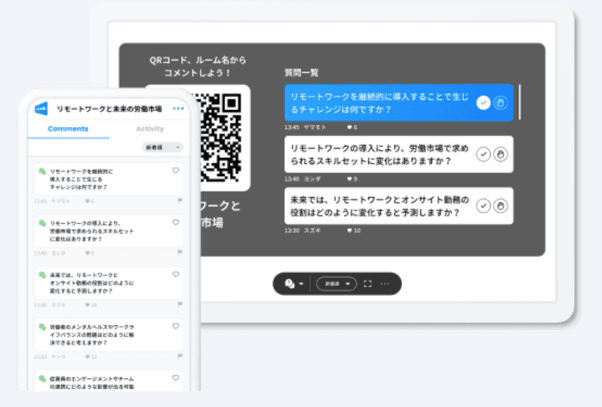
Without seeing everyone’s faces, it can be difficult to gauge reactions. Tools with comments and reactions help.
Displaying them on the broadcast screen lets organizers see audience opinions in real time, interact with participants, and judge the level of excitement.
Reference: CommentScreen
CommentScreen lets participants post comments and reactions during a stream. It also includes polls and other features that encourage involvement. Contact us below for details.
2. Share preparation updates regularly
To attract more participants:
- Announce the meeting in the company newsletter.
- Share regular behind-the-scenes updates.
Keeping the event visible can generate interest. Encouraging voluntary participation through interest, rather than requiring attendance, can help create a more lively meeting.
3. Build in opportunities for employees to interact
Ideas include:
- Free conversation before and after sessions
- Participatory activities using chat
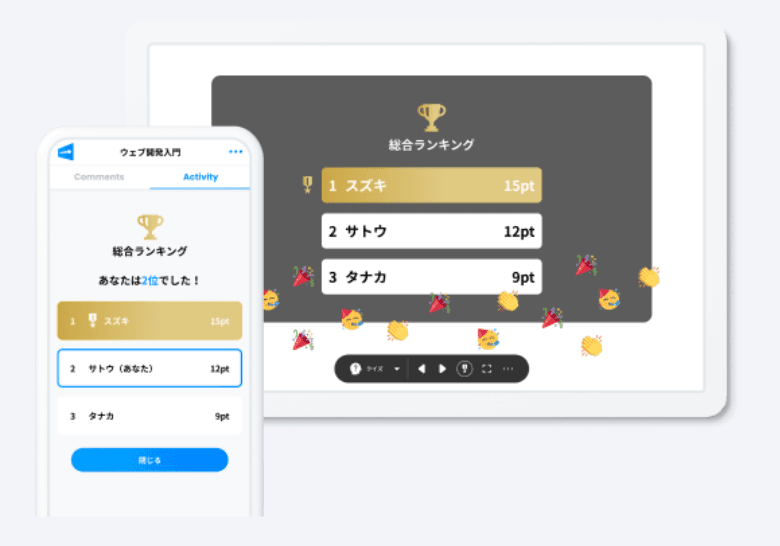
- Games and quizzes that help employees connect
- Surveys that make it easy for everyone to contribute
Reference: CommentScreen
These are only examples. Develop a program that will appeal to your own employees.
Reduce the burden of company meetings by going online
Online all-hands meetings reduce venue preparation and employee travel while making it easier for more people to attend.
If you are organizing one for the first time, deciding how to run it and what equipment or tools to use can be difficult. Consider consulting a professional.
Contact us below for advice on platforms and event planning.